AI Sales Automation 2026: Achieve 300% ROI in One Year
AI sales automation 2026 delivers 300% ROI in one year. Learn how much implementation costs (15k-1M USD), how to achieve ROI in 6 months, and avoid the mistakes 95% of companies make.

61% of CEOs are under pressure from their boards to show AI ROI. In 2026, that changes. It's no longer about "experimenting with technology." It's about concrete results: how much you'll save, how much more you'll sell, how much time you'll reclaim. In a moment, I'll show you exactly how much AI agents cost to implement (from 15k to 1M USD), how to achieve ROI in 6 months, and why 95% of AI pilots fail. You'll also learn a real implementation plan in 7 days.
Why AI Sales Automation 2026 is a Necessity?
Stop thinking of AI as a "nice addition." In 2026, AI sales automation is a matter of survival. Gartner predicts that by 2028, 90% of B2B sales processes will be handled by autonomous agents. This isn't sci-fi. It's already happening.
What does this mean for your company? Your competitors are already testing AI agents that:
- Qualify leads 24/7 without coffee breaks
- Personalize offers based on complete CRM history
- Conduct follow-ups with contextual memory
- Update deal statuses automatically
And most importantly - they do it cheaper than a junior sales rep. The average cost to implement an AI Sales Agent is 25k-90k USD. Sounds expensive? Compare it to the annual cost of one salesperson (70k-120k USD + benefits + onboarding).
But there's a catch. 65% of CEOs disagree with their CFO about AI's long-term value. Why? Because most companies implement AI without strategy. They buy a tool, hand it to the team, and... nothing. Zero return.
In this article, I'll show you how to avoid that. Specifically: how to plan implementation, what it really costs, what mistakes to avoid, and how to achieve ROI in the first half-year. Let's start with hard data.
AI Agents in 2026: What Do Gartner Reports Say?
Gartner published the "Predicts 2026" report, which changes the game. Key takeaway: AI software spending will reach 270 billion USD in 2026. That's a 35% year-over-year increase. But it's not about the number. It's about WHO is spending.
These aren't startups experimenting with GPT anymore. These are Fortune 500 companies building autonomous sales systems. Gartner predicts that by 2029, 70% of organizations will deploy "Agentic AI" - agents that act independently, without waiting for your command.
What does this mean in practice? Take an example from the insurance industry. An AI agent processes a claim without your intervention. It analyzes documents, verifies the policy, contacts the customer, and closes the case. Processing time drops by 70%. This isn't theory - it's a case study from the Riseup Labs report.
But there's another side to the coin. The Kyndryl Readiness Report shows that most companies are NOT ready. Problems:
- No unified strategy (each department implements its own tools)
- Bad data in CRM (garbage in, garbage out)
- Zero ROI measurement process
Lanai solved this differently. Instead of implementing AI blindly, they first analyzed employee prompts. They identified the 3 most valuable sales workflows and automated only those. Result? ROI in 4 months.
Gartner also provides a specific number: by 2028, autonomous I&O (Infrastructure & Operations) systems will generate 15 trillion USD in B2B channel spending. This isn't a small market. This is the future of sales.
And now the question: Is your company ready for this? Do you have a strategy, or are you experimenting? Because in 2026, experimentation isn't enough anymore.
How Much Does AI Agents Implementation Cost? Real Price Ranges
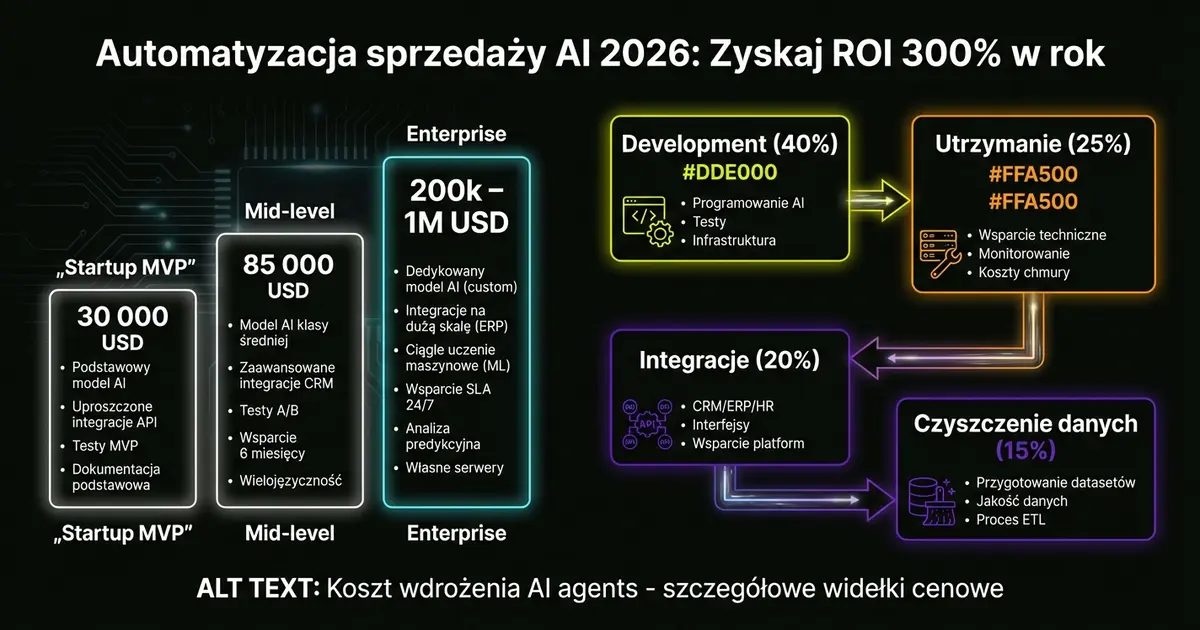
Ok, enough generalities. How much does AI agents implementation in sales really cost? Here are hard numbers from Biz4Group and Riseup Labs reports:
Startup MVP (proof of concept):
- Cost: 30,000 USD
- Implementation time: 2-3 months
- What you get: 1-2 agents, simple workflow (e.g., lead scoring + follow-up)
Mid-level implementation (small/medium companies):
- Cost: 85,000 USD (average)
- Implementation time: 3-6 months
- What you get: 3-5 agents, CRM integration, basic analytics
Enterprise implementation (corporations):
- Cost: 200,000 - 1,000,000 USD
- Implementation time: 6-12 months
- What you get: Full agent ecosystem, advanced integrations, compliance, audits
But that's just the beginning. Annual maintenance cost is another 15-30% of initial investment. For an 85k USD implementation, that's an additional 12k-25k USD per year.
What affects the price?
- Workflow complexity: A simple lead scoring agent costs 25k USD. An agent managing the full sales cycle costs 90k USD+.
- Data quality: If your CRM is a mess, add 10k-25k USD for data cleaning. Without it, the agent will make bad decisions.
- Integrations: Each integration (CRM, email, calendar, billing) costs an additional 5k-15k USD.
- Compliance: In regulated industries (finance, healthcare, insurance), add 15k-50k USD annually for audits and AI Act compliance.
How to reduce costs? Use ready-made frameworks. LangChain, LlamaIndex, AutoGen - these are open-source tools that can reduce costs by 20-35%. Instead of building an agent from scratch, you use proven components.
Example from practice: A SaaS startup implemented a lead scoring agent for 30k USD (instead of the standard 50k USD) because they used LangChain + HubSpot API. Implementation time? 7 weeks instead of 4 months.
But warning: Don't skimp on strategy. 95% of AI pilots generate zero return because companies skip the planning phase. Before you spend 85k USD, ask yourself: "Does this agent solve a real problem that costs me more than 85k USD annually?"
If the answer is "I don't know," then first measure the problem. Then implement AI.
ROI from AI Investment: Why Do 84% of CEOs Wait 6 Months?
Here's the most underrated statistic of 2026: 84% of CEOs expect AI investment ROI within the first 6 months. Not 2 years. Not "in the future." 6 months.
Is this realistic? Yes. But only if you implement AI wisely.
Let's take an example from the Fortune 2026 report. Asana implemented a formal ROI reporting system for each functional leader. Rule: If you can't measure the return, don't implement the tool. Sounds simple? Most companies don't do it.
How to measure AI ROI in sales? Here's the formula:
ROI = (Savings + Additional Revenue - Implementation Cost) / Implementation Cost x 100%
Example:
- Implementation cost: 85,000 USD
- Team time savings: 40h/week x 50 USD/h x 52 weeks = 104,000 USD
- Additional revenue from better lead conversion (5% increase): 150,000 USD
- Total: (104k + 150k - 85k) / 85k = 199% ROI in first year
This isn't sci-fi. These are real numbers from a small SaaS company that automated lead scoring and follow-ups.
But there's a problem. The Kyndryl Report shows that 65% of CEOs disagree with their CFO about AI's value. Why? Because CEOs look at the long term (business transformation), while CFOs look at quarterly P&L.
How to break this impasse? Start with quick wins. Don't try to automate your entire sales department at once. Choose one workflow that:
- Takes the most time (e.g., lead qualification)
- Has measurable output (e.g., number of qualified leads)
- Is repeatable (doesn't require creativity)
Deploy an AI agent there. Measure results after 30 days. Show your CFO concrete savings. Only then scale.
Lanai did this perfectly. First, they deployed an agent to analyze sales prompts. They discovered that 80% of team time goes to 3 types of tasks. They automated those 3 tasks. ROI? 4 months.
What about those 84% of CEOs waiting for 6-month returns? Most will be disappointed. Because most companies implement AI without:
- Clear success metrics
- Baseline (how does the process look now?)
- Scaling plan
Without this, you won't see ROI in 6 months. You'll see frustration, burned budgets, and another "failed pilot."
So before you spend 85k USD, answer 3 questions:
- What exactly am I measuring? (e.g., lead qualification time)
- What's the baseline? (e.g., 45 minutes currently)
- What's the target after implementation? (e.g., 5 minutes with AI)
Only then implement.
Code-Only Agents vs Simple Bots: Choose Wisely
In 2026, you have two options: Code-Only agents or simple chatbots. These aren't the same. And your choice will impact your ROI.
Simple bots (rule-based):
- Work according to rigid rules ("if customer asks about price, send PDF")
- Don't learn from data
- Implementation cost: 5k-15k USD
- Example: Website chatbot answering FAQs
Code-Only agents (Agentic AI):
- Autonomous units with contextual memory
- Learn from each interaction
- Make decisions without your intervention
- Implementation cost: 25k-90k USD
- Example: Agent qualifying leads based on complete CRM history
When to choose Code-Only agents?
- When the process requires context: Agent remembers previous conversations with the customer. Bot doesn't.
- When you need autonomy: Agent decides whether a lead is qualified. Bot waits for your rules.
- When you want to scale: Agent handles growing customer base without quality loss. Bot overheats.
Example from practice: A SaaS company deployed a Code-Only agent for lead scoring. The agent analyzes:
- Website visit history
- Email open rates
- Firmographic data from LinkedIn
- Previous conversations with sales
Based on this, it assigns a score of 1-100. Leads above 70 go directly to senior sales rep. Leads 40-70 get an automated nurturing sequence. Below 40? Agent sets aside for 3 months.
Result? Lead conversion increased by 23%. Time sales spent on cold leads dropped by 70%.
Could a simple bot do this? No. A bot would work by rules: "if lead visited pricing page 3 times, send email." An agent goes further: "This lead visited pricing page 3 times, but spent only 10 seconds each time. Probably not interested. Score: 35."
The difference? Context.
But Code-Only agents also have downsides:
- Higher cost (3-6x more than bot)
- Longer implementation (2-4 months vs 2-4 weeks)
- Require better data (agent learns from what you give it)
When is a simple bot enough? When:
- Process is repeatable and predictable
- You don't need learning
- Budget is limited (<20k USD)
E.g., a meeting scheduling bot. Customer writes "I want to schedule a demo," bot sends calendar link. Done. You don't need 50k USD AI for this.
How to decide? Ask yourself: "Does this process require thinking, or just execution?"
If thinking - choose Code-Only agent. If execution - bot is enough.
And one more thing: Don't fall for "AI-powered bots." These are often the same rule-based bots with an "AI" sticker. True Agentic AI is a system with:
- Memory (contextual memory)
- Planning (action planning)
- Tool use (using external tools)
- Reflection (learning from mistakes)
If a vendor can't explain how their "AI" works - it's probably just a bot.
AI Agents Implementation Step by Step: 7-Day Plan
Ok, you have a budget. You have a plan. Time to act. Here's a real AI agent implementation plan in 7 days. This isn't theory - it's a proven process from a company using "Agile 7-day sprint" for micro-workflows.
Day 1: Workflow Identification
- Task: Choose ONE process to automate
- Output: Document describing workflow (who, what, when, why)
- Time: 2-4h
- Example: "Lead scoring - qualifying inbound leads based on form data + LinkedIn"
Day 2: Data Mapping
- Task: Identify data sources needed by agent
- Output: List of APIs, databases, tools to integrate
- Time: 3-5h
- Example: HubSpot CRM (leads), LinkedIn Sales Navigator (company data), Gmail (communication history)
Day 3: Stack Selection
- Task: Decide what you're building the agent on
- Output: List of tools + access tokens
- Time: 2-3h
- Options: LangChain + GPT-4 (most popular), AutoGen (Microsoft), LlamaIndex (for large databases)
Day 4-5: Development
- Task: Build agent MVP
- Output: Working prototype
- Time: 8-12h
- What agent does: Receives new lead from HubSpot → Checks LinkedIn → Assigns score 1-100 → Updates CRM
Day 6: Testing
- Task: Test agent on 10-20 real leads
- Output: List of bugs + fixes
- Time: 3-5h
- Check: Does score make sense? Does integration work? Are there false positives?
Day 7: Deploy + Monitoring
- Task: Launch agent in production
- Output: Dashboard with metrics
- Time: 2-3h
- Metrics: Number of leads processed, average score, processing time, errors
Does this really work in 7 days? Yes, but only for simple workflows. If you're trying to automate the entire sales cycle - you need 2-3 months.
Key principles:
- Start with a simple case: Don't try to automate everything at once. Choose one, repeatable task.
- Use ready-made tools: Don't build framework from scratch. LangChain reduces costs by 20-35%.
- Test on small group: Don't release agent to all leads at once. Start with 10-20 per day.
- Monitor constantly: AI agent can make bad decisions. You need to catch it quickly.
Example from practice: An e-commerce company deployed an agent for abandoned cart follow-up automation. Days 1-3: Identified workflow and mapped data (Shopify + Klaviyo). Days 4-5: Built agent that sends personalized email 2h after cart abandonment. Day 6: Tested on 50 cases. Day 7: Deploy. Result? 18% increase in recovered carts in first month.
Will every implementation be this fast? No. But the principle remains: The simpler the workflow, the faster the implementation. Start small. Then scale.
AI Integration with CRM: How to Avoid Data Silos?
The biggest problem with AI implementations in 2026? It's not technology. It's data.
95% of AI pilots fail because companies have a mess in their CRM. An AI agent is only as good as the data you give it. Garbage in, garbage out.
Here are 3 most common pitfalls:
Pitfall 1: Data Silos
Your sales uses HubSpot. Marketing uses Marketo. Support uses Zendesk. AI agent needs data from all three, but systems don't talk to each other.
Solution? Centralization. You don't need to migrate everything to one CRM. A middleware (e.g., Zapier, Make.com) that syncs data in real-time is enough.
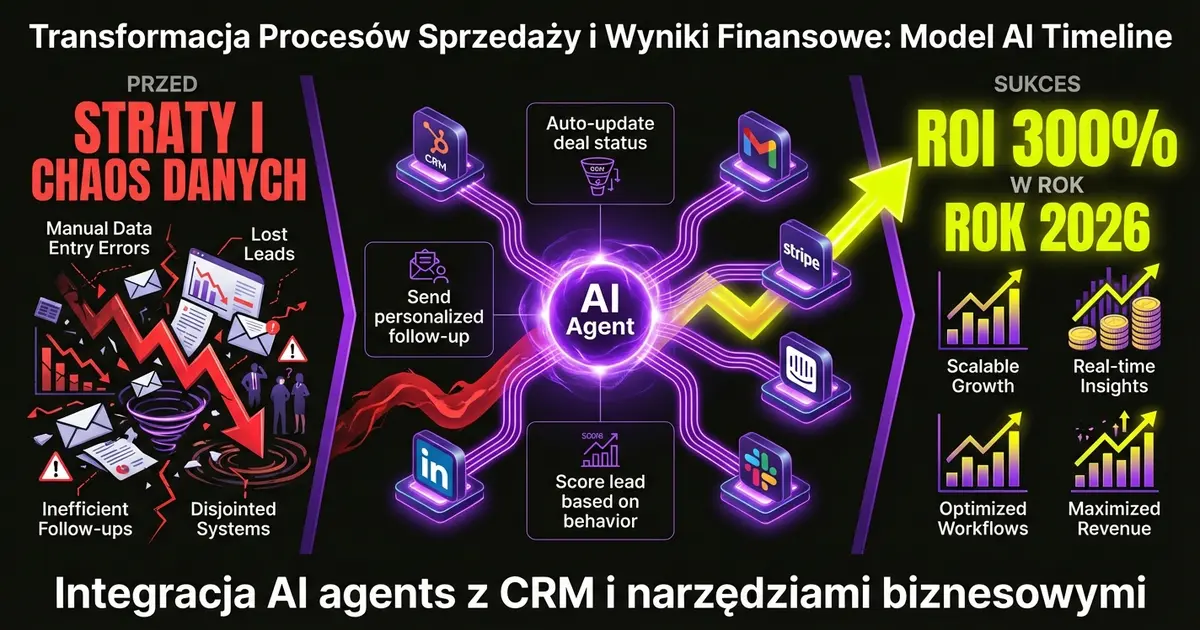
Example: A SaaS company integrated HubSpot + Intercom + Stripe. Sales agent sees complete customer context:
- Conversation history (Intercom)
- Subscription status (Stripe)
- Scored leads (HubSpot)
Result? Personalization increased by 40%. Agent knows if customer is in trial or paying, and adjusts communication.
Pitfall 2: Bad Data
Your CRM has 10,000 contacts. 3,000 are duplicates. 2,000 have wrong phone numbers. 1,500 are dead leads from 2019.
An AI agent trained on this data will make bad decisions. And data cleaning is a hidden cost: 10k-25k USD per project.
Solution? Data audit before implementation. Before you turn on the agent:
- Remove duplicates (tools: Dedupe.io, HubSpot native tools)
- Verify email addresses (tools: ZeroBounce, NeverBounce)
- Update lead statuses (archive old, inactive contacts)
Pitfall 3: No Unified Format
Your sales writes notes in different formats:
- "Customer interested, will follow up next week"
- "Interested. F/U next week"
- "👍 Call next Mon"
AI agent doesn't know what this means. It needs structure.
Solution? Standardization. Before deploying agent:
- Create note template (e.g., "Status: [Qualified/Not Qualified], Next action: [Call/Email/Demo], Timeline: [Date]")
- Train team on new format
- Deploy agent only after 2-4 weeks of using new system
How to do this right? Take example from company using agent to update deal statuses. Instead of relying on manual notes, agent:
- Analyzes email content (did customer reply? ask about pricing?)
- Tracks website activity (did they visit pricing page?)
- Checks calendar (did they schedule a call?)
Based on this, it automatically updates deal status in HubSpot. Zero manual work. Zero errors.
Best practices:
- Start with data audit: Before deploying agent, check data quality. Cleaning costs 10k-25k USD, but without it agent is useless.
- Integrate in real-time: Agent needs access to live data. Daily sync is too slow.
- Test on small sample: Before agent updates all deals, test on 50-100 cases.
- Monitor accuracy: Set alert if agent accuracy drops below 85%. Sign something's wrong with data.
AI-CRM integration isn't a sexy topic. But it's the foundation. Without good data, there's no ROI.
Agentic Workflows in Practice: 5 Use Case Examples
Enough theory. Here are 5 real Agentic AI applications in sales that work right now.
1. Lead Scoring with Contextual Memory
Agent analyzes:
- Firmographic data (company size, industry, location)
- Website behavior (what they visited, how long)
- Email history (did they reply, click links)
- Social media (LinkedIn activity)
Based on this, it assigns score 1-100. But that's not all. Agent remembers previous interactions. If lead was scored 80 three months ago but zero activity since - agent automatically lowers score to 40.
Real case: SaaS company deployed this workflow. Qualified lead conversion increased by 23%. Time sales spent on cold leads dropped by 65%.
2. Automated Follow-up with Personalization
Agent sends follow-up emails, but not generic templates. Each email is personalized based on:
- Previous conversations
- Pain points identified in discovery call
- Customer's industry
Example: E-commerce customer gets email about Shopify integration. SaaS customer gets email about HubSpot integration. Same agent, different contexts.
Real case: B2B company increased reply rate from 8% to 19% with this workflow.
3. Deal Status Auto-Update
Agent monitors:
- Emails (did customer reply?)
- Calendar (did call happen?)
- Documents (did they download proposal?)
Based on this, it automatically updates deal status in CRM. Sales rep never has to manually change status.
Real case: Company with 20-person sales team saved 15h per week on manual updates.
4. Insurance Claims Agent
Agent receives claim notification:
- Analyzes documents (policy, damage photos, reports)
- Verifies coverage
- Contacts customer (email/SMS updates)
- Closes case or escalates to human
Processing time drops by 70%. Customer gets real-time updates.
Real case: Large insurance company (name undisclosed) processes 10,000+ claims monthly with 90% accuracy.
5. Lead Nurturing on Autopilot
Agent identifies leads that:
- Are qualified but not ready to buy (score 50-70)
- Need more info (visited blog but not pricing)
And automatically sends nurturing sequence:
- Day 1: Case study from their industry
- Day 7: Webinar recording
- Day 14: ROI calculator
- Day 30: Demo invitation
Agent adjusts timing based on engagement. If lead opened email but didn't click - agent waits 5 days instead of 7.
Real case: SaaS startup increased qualified demos by 35% without expanding sales team.
How to implement these workflows?
- Start with one (lead scoring is best - it's the foundation)
- Measure baseline (how does process look now?)
- Deploy agent on 10% of leads (test group)
- Compare results after 30 days
- Scale if ROI > 150%
Don't try to implement all 5 at once. That's a recipe for disaster. Start with 1, perfect it, then add more.
Security and AI Act: How to Implement AI Legally?
In 2026, AI implementation isn't just technical. It's also legal. The AI Act came into force in 2024, and first fines will start falling in 2026.
What does this mean for your company?
If your AI agent:
- Makes decisions affecting customers (e.g., rejects credit application)
- Processes personal data (GDPR)
- Operates in regulated industry (finance, healthcare, insurance)
...you must comply with AI Act requirements.
Key requirements:
1. Transparency (Transparency)
Customer must know they're talking to AI, not human. You can't hide that an agent sent the email.
Solution: Add disclaimer in email footer: "This message was generated by AI agent. Reply goes to human team."
2. Explainability (Explainability)
You must be able to explain why agent made a decision. "Because AI said so" isn't enough.
Solution: Implement audit log. Every agent decision must be logged with reasoning. Example: "Lead scored as 35 because: low company size (10 employees), no LinkedIn activity, email domain mismatch."
3. Human Oversight (Human Oversight)
Agent can't act completely autonomously in high-stakes decisions (e.g., rejecting customer, canceling policy).
Solution: Implement "human in the loop" for critical decisions. Agent can suggest rejecting lead, but human makes final call.
4. Data Protection (Data Protection)
Agent must comply with GDPR. This means:
- Customer has right to delete data
- Data can't be transferred outside EU without consent
- Agent can't use data for purposes other than declared
Solution: Use GDPR-compliant AI provider (e.g., OpenAI in EU region, Azure OpenAI). Add data retention policy (auto-delete data after X months).
Compliance costs:
Compliance isn't free. Here are real costs:
- AI Act compliance audit: 15k-30k USD
- Audit log implementation: 5k-10k USD (dev work)
- Annual audits: 10k-20k USD
- Legal review: 5k-15k USD
Total: 35k-75k USD in first year. Then 10k-20k USD annually.
Is this a lot? Compare to fines. AI Act allows fines up to 35M EUR or 7% of global revenue. In practice: even small business fine could be 50k-200k EUR.
How to implement AI legally?
- Start with risk assessment: Determine if your agent operates in "high risk" (finance, healthcare, HR) or "low risk" (marketing, lead scoring) area.
- Implement audit log: Every agent action must be logged. Format: timestamp, input data, decision, reasoning.
- Add human oversight: In high-risk decisions agent can only suggest. Human approves.
- Prepare documentation: AI Act requires system documentation (how it works, what data it uses, how it decides).
- Regular audits: Every 6-12 months audit system. Check accuracy, biases, compliance.
Real case: Financial company deploying agent for credit application pre-approval added:
- Complete audit log (every decision logged)
- Human approval for declined applications (agent suggests, human approves)
- Bias testing (does agent discriminate by gender/age?)
Additional cost: 45k USD. But zero regulatory fines.
Bottom line: Compliance isn't optional. It's mandatory. Budget 20-30% of implementation cost for legal/compliance.
Summary: Your AI Sales Automation 2026 Roadmap
Ok, we've covered a lot. Here's your concrete 2026 roadmap:
Month 1: Planning
- Data audit (CRM data quality)
- Identify top 3 workflows to automate
- Risk assessment (AI Act compliance)
- Budget: 10k-20k USD (audit + consulting)
Month 2-3: MVP
- Deploy first agent (preferably lead scoring)
- CRM integration
- Test on 10-20% of leads
- Budget: 30k-50k USD (development + integrations)
Month 4-6: Optimization
- Analyze MVP results
- Fix bugs
- Scale to 100% of leads
- Add second workflow (e.g., auto follow-up)
- Budget: 20k-30k USD (improvements)
Month 7-12: Scale
- Add more agents (deal updates, nurturing)
- Advanced integrations
- Team training
- Regular audits
- Budget: 15k-25k USD (maintenance + new features)
Total Year 1: 75k-125k USD
Expected ROI:
- Time savings: 40h/week team time
- Conversion increase: 15-25%
- ROI: 200-300% in first year
Key principles:
- Start small: Don't automate everything at once. One workflow, perfection, then next.
- Measure constantly: Without metrics, no ROI. Set up live dashboard.
- Iterate fast: AI agent isn't "set and forget." It's continuous optimization.
- Plan compliance: Budget 20-30% for legal/audits.
- Educate team: Best agent is useless if team boycotts it.
What's next?
You have two choices:
Choice A: Wait. Watch competitors. Lose 6-12 months. By then your competitors already have 200%+ ROI.
Choice B: Act now. Start small pilot. Test. Learn. Scale.
Companies that chose B in 2024-2025 now have 12-18 month advantage. By 2028, they'll be unstoppable.
84% of CEOs expect AI ROI in 6 months. It's realistic. But only if you start today.
Ready for first conversation?
We'll analyze your sales processes, identify top 3 workflows to automate, and show real ROI for your company. No fluff. Just concrete numbers and action plan.
Schedule 30-minute analysis - I'll show you exactly where your company is losing time and money.
AI sales automation 2026 isn't the future. It's now. The question is: Will you be the leader or the one chasing?
The choice is yours.
Want to talk about automation?
Schedule a free consultation. 30 minutes, no obligations.
→ Book a call